
Right Fields for Every Property.
Every Stage.
Every Role.
Conditional Layouts tailor the real estate CRM interface strictly based on predefined conditions configured by your business. Agent screens and fields automatically adjust based on defined conditions, showing only relevant information for faster, accurate data capture.

One R2. Many Property Journeys.
Zero Confusion.
Conditional Layouts adapt screens dynamically to match how real estate transactions work on projects, stage by stage.

About This Feature
Conditional Layouts embed real estate logic directly into R2 screens. As users select a property category, budget, city, project, or deal stage, the layout updates instantly, showing only required fields while hiding everything else.

What Makes Conditional Layouts
Essential for Real Estate

Property-Type Driven Layouts
Different fields for apartments, villas, plots, commercial spaces, or rentals.
Deal-Stage Smart Screens
Enquiry, site visit, negotiation, booking, and post- sales each trigger relevant inputs automatically.
Role-Based Visibility
Sales agents, channel partners, managers, and admins work on layouts designed for their responsibilities.
Accurate Enquiry & Listing Capture
Mandatory fields activate contextually, preventing missing budgets, locations, or unit details.
Property-Type Driven Layouts
Different fields for apartments, villas, plots, commercial spaces, or rentals.
Property-Type Driven Layouts
Different fields for apartments, villas, plots, commercial spaces, or rentals.
Deal-Stage Smart Screens
Enquiry, site visit, negotiation, booking, and post- sales each trigger relevant inputs automatically.
Role-Based Visibility
Sales agents, channel partners, managers, and admins work on layouts designed for their responsibilities.
Accurate Enquiry & Listing Capture
Mandatory fields activate contextually, preventing missing budgets, locations, or unit details.
Real-Life Scenario for a
Real Estate Sales Team
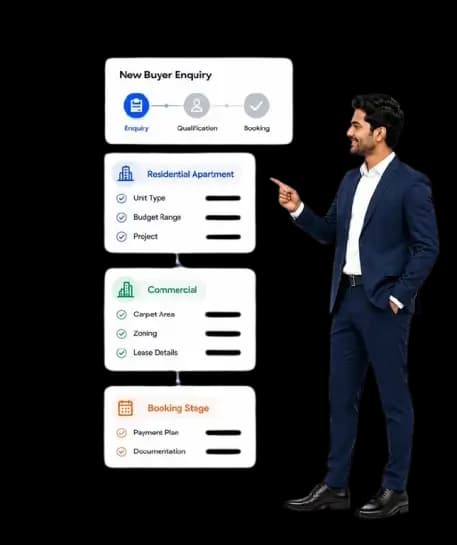
An agent creates a new buyer's enquiry. In generic R2, all property fields appear, slowing entry and causing errors.
 With Conditional Layouts:
Selecting Residential Apartment shows unit type, budget range, and project fields
Choosing Commercial switches to carpet area, zoning, and lease details
Moving to the Booking Stage reveals the payment plan and documentation fields
Result:
Faster updates, cleaner enquiries, and sales-ready data at every stage.
Proven Business Impact
Faster Enquiry & Deal Updates
Higher Data Accuracy Across Properties
Reduced Training Time for New Agents
Cleaner Project & Inventory Reports
Consistent Sales Execution Across Teams
Faster Enquiry & Deal Updates
Higher Data Accuracy Across Properties
Reduced Training Time for New Agents
Cleaner Project & Inventory Reports
Consistent Sales Execution Across Teams

Build a Real Estate CRM with
Conditional Layouts
Match your R2 screens to real-world property workflows. Simplify data capture, enforce process discipline, and scale operations confidently.